A message we got recently went roughly like this: "I opened an email on my iPhone from a coworker, tapped the link to the document, and nothing came up. Do you think I'm OK?"
Asking that question was exactly the right move. Plenty of people in the same spot close the email, feel a little uneasy, and tell no one. Most of the time a single click isn't a disaster. But what you do in the next ten minutes can make the difference between nothing happening and a long, expensive week.
What a click usually does
Clicking a link, by itself, usually isn't the dangerous part. Most phishing emails are after one of three things: your password, a file you'll open, or your approval on a sign-in prompt.
The common version sends you to a fake Microsoft or Google sign-in page that looks like the real one. Type your email and password there and the attacker has them. Another version gets you to download and open a file, often dressed up as an invoice, a shared document or a voicemail. The newer trick is a sign-in prompt on your phone that you approve because it looks routine.
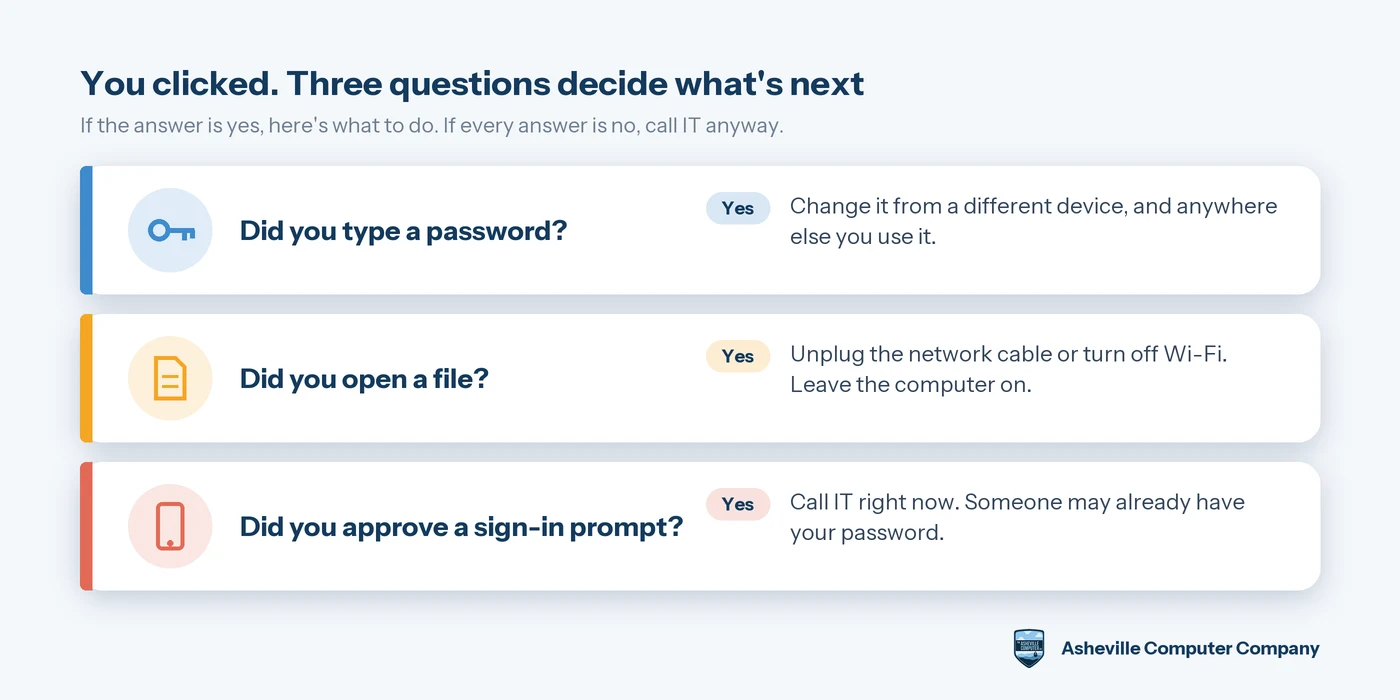
So the questions that matter are: Did you type a password anywhere after clicking? Did you download or open anything? Did you approve a sign-in prompt you didn't start? If the answer to all three is no, you're probably fine, and it's still worth a quick call.
What to do in the first ten minutes
Stop and close the page. Don't enter anything else, even if the page says your session expired or asks you to try again.
Call your IT person. Don't email them. If your mailbox has been taken over, an email about it may be read by the wrong person, or never arrive. Tell them what you clicked, roughly when, and on which device.
If you typed a password, change it from a different device. Use a computer or phone you trust, not the one you clicked on. If you've used that password anywhere else, change it there too. Your IT provider can also sign you out everywhere and check whether anything was changed on your account.
If you approved a sign-in prompt you didn't start, say so right away. This one matters most. It can mean someone already has your password and just got past the second step.
If you opened a file on a computer, take it off the network. Unplug the network cable or turn off Wi-Fi, but leave the computer on so it can be checked.
Don't forward the email to coworkers to ask if it's real. Send it, or a screenshot, to IT only. Forwarding it around gives more people a chance to click.
Why deleting it quietly is the wrong move
When a suspicious email comes from someone you know, like a coworker, a vendor or a customer, the account it came from may already be compromised. If it is, that account is probably sending the same message to other people right now, including your customers.
An early report lets IT pull the message out of everyone's inbox, find out who else clicked, and look at what the attacker may have set up. One of the first things attackers do in a stolen mailbox is create hidden rules that forward copies of your mail to them or delete replies before you see them. That's how fake invoice and payment-change scams get started: the attacker quietly watches a real conversation, then steps into it at the right moment. We've written about a couple of those scams before, including deepfake voice calls and the fake quote request.
The sooner someone looks, the less time those rules have to work.
Does it matter that it was a phone?
Somewhat. Phones are generally harder to infect just by opening a link than a Windows computer that downloads and runs a file. But the fake sign-in page works the same way on a phone, and the small screen makes it harder to see the web address and notice that something is off.
So on a phone, the question is the same: did you type a password or approve anything? If not, you're most likely fine. If you did, follow the steps above.
Make reporting easy
People hide clicks when they think they'll get in trouble. Then a five-minute fix turns into a mess discovered weeks later.
If you own or manage a business, say it out loud to your team: reporting a click will never get anyone in trouble, and reporting it fast is the most helpful thing they can do. Put your IT contact's phone number somewhere easy to find, not just in an email signature.
What your IT provider should check
When someone reports a click, a good IT provider doesn't stop at "you're probably fine." Depending on what happened, they should look at recent sign-ins to the account, any new inbox rules or forwarding, any new sign-in methods added, and alerts from the endpoint protection on the computer involved. No single tool catches everything, which is why these checks happen in layers. Each one is there to catch something the last one might have missed.
Final thoughts
Clicking a bad link happens to careful people. What separates a non-event from a real incident is usually how fast someone speaks up.
So if you clicked, don't panic and don't keep it to yourself. Close the page, call IT, and answer three questions honestly: did I type a password, did I open a file, did I approve a prompt.
Asheville Computer Company provides layered cybersecurity and day-to-day IT support for businesses across Asheville, Arden, Fletcher, Hendersonville and Western North Carolina. When someone calls to say "I clicked something," we would much rather hear it that day than a month later.